



Enhance Your Design Workflow with
Our streamlined design workflow plugins are engineered to revolutionize how AEC professionals approach their projects. By automating repetitive tasks and enhancing collaboration, our plugins significantly reduce project timelines and minimizes errors. Experience a seamless integration with your existing software and unlock new levels of efficiency.
Family Browser – Smarter Content Management for Revit
Take control of your Revit workflow with Family Browser, the industry-leading content management solution trusted by architects, engineers, and designers worldwide.
- Instant Access: Organize and launch your Revit families with a single click—no more wasted time searching through folders.
- Streamlined Productivity: Keep your team aligned with a centralized library that ensures consistency across projects.
- Customizable & Scalable: Tailor Family Browser to your firm’s standards, whether you’re managing a small studio or a global enterprise.
- Seamless Integration: Designed to work natively within Revit, Family Browser enhances your workflow without disrupting it.
With Family Browser, your content is always organized, accessible, and reliable—so you can focus on design, not file hunting.
Elevate your Revit experience. Discover why Family Browser is the smartest way to manage families in Revit.
Discover the Power of Family Browser – The Ultimate Revit Content Manager
Family Browser transforms the way your team works in Autodesk Revit, delivering speed, simplicity, and control like never before. With its intuitive design and powerful features, you’ll streamline workflows, boost productivity, and ensure your users always have the right content at their fingertips.
Top 10 Features That Set Family Browser Apart
Drag & Drop Palette: Insert Revit content instantly with a sleek, integrated palette that makes workflows effortless.
Lightning-Fast Setup: Deploy your company’s content library to all users in minutes—no complicated configuration required.
Seamless Sharing: Distribute content across multiple offices and locations with ease, ensuring consistency everywhere.
Smart Search: Find exactly what you need with powerful search functionality and instant feedback.
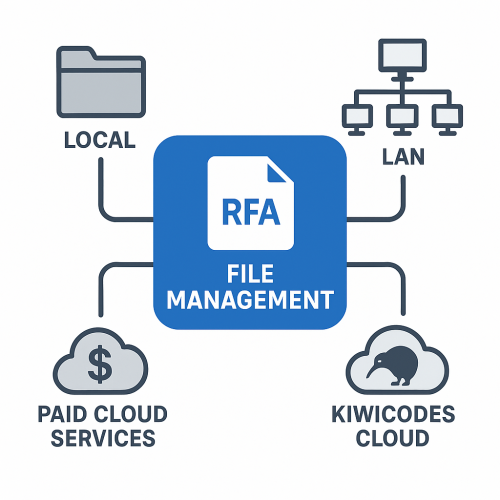
Flexible Storage Options: Host content locally, on LAN, or in the cloud with built-in support for Dropbox, OneDrive, and SharePoint.
Real-Time Updates: Add or remove files in Windows Explorer and see changes reflected instantly across all users.
Versatile Content Support: Manage RFA families, system families, schedules, legends, drafting views, plus PDFs, MP4s, and DOCX files.
Web-Based Admin Portal: Control settings, users, and databases from a centralized, easy-to-use dashboard.
Live Analytics: Gain insights into user behavior and track the most-used content with real-time reporting.
Flexible Licensing: Enjoy floating licenses that adapt to your needs—install anywhere, run as many sessions as your subscription allows.
Why Choose Family Browser?
Because content management shouldn’t slow you down—it should empower your team. With Family Browser, you’ll save countless hours, eliminate inefficiencies, and deliver projects with confidence.
Try Family Browser today and experience the future of Revit content management.
File Management Made Easy
Take your design libraries to the next level with Kiwicodes Cloud Storage, built for the AEC industry and powered by Microsoft Azure’s secure cloud services.
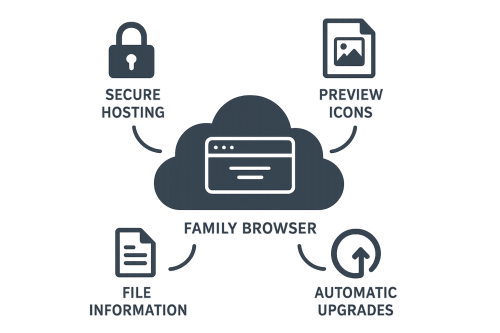
Enterprise-grade security: Your files are safely stored and protected on Azure Cloud.
Automatic intelligence: Thumbnails and file information are extracted instantly, making browsing effortless.
Family version upgrades: Keep your Revit families up to date with Autodesk Platform Services integration.
Web-based management: Access and organize your libraries anytime, anywhere through a streamlined web portal.
Collaborative sharing: Share libraries seamlessly between companies, ensuring teams stay aligned.
Effortless organization: Simplify file and library management with intuitive tools designed for productivity.
With Kiwicodes Cloud Storage, you don’t just store files—you unlock a connected, intelligent, and collaborative ecosystem that makes managing design assets easier than ever.
KiwiCodes Cloud Storage
Take your design libraries to the next level with Kiwicodes Cloud Storage, built for the AEC industry and powered by Microsoft Azure’s secure cloud services.
Enterprise-grade security: Your files are safely stored and protected on Azure Cloud.
Automatic intelligence: Thumbnails and file information are extracted instantly, making browsing effortless.
Family version upgrades: Keep your Revit families up to date with Autodesk Platform Services integration.
Web-based management: Access and organize your libraries anytime, anywhere through a streamlined web portal.
Collaborative sharing: Share libraries seamlessly between companies, ensuring teams stay aligned.
Effortless organization: Simplify file and library management with intuitive tools designed for productivity.
With Kiwicodes Cloud Storage, you don’t just store files—you unlock a connected, intelligent, and collaborative ecosystem that makes managing design assets easier than ever.
Supercharge Your Revit Workflow with Kiwicodes Bonus Tools
Why waste hours on repetitive tasks when you can automate them? Kiwicodes Bonus Tools is a powerhouse collection of over 150 specialized apps designed to save time, reduce errors, and boost productivity in Autodesk Revit. Trusted by architects, engineers, and designers worldwide, Bonus Tools delivers the smart shortcuts your projects deserve.
What Makes Bonus Tools Essential:
- Massive Library of Utilities: From sheet duplication and view management to parameter control and 3D navigation, there’s a tool for every workflow.
- Automation at Scale: Eliminate tedious button-clicking with intelligent automation that streamlines documentation, modeling, and coordination.
- Error Reduction: Built-in oversight tools help maintain accuracy and consistency across projects.
- Customizable Ribbon Settings: Tailor your workspace with personalized ribbons, panels, and buttons to match your team’s unique needs.
- Cloud-Ready Licensing: Share settings and distribute tools effortlessly across teams and offices, keeping everyone aligned.
- Future-Proofed: With support for the latest Revit releases, Bonus Tools evolves alongside your practice.
Real-World Impact: Users report saving hours every week by automating repetitive tasks—translating directly into cost savings and faster project delivery. Whether you’re duplicating sheets, aligning views, or managing families, Bonus Tools ensures your team spends less time clicking and more time designing.
Boost productivity. Reduce wasted effort. Transform your Revit experience with Kiwicodes Bonus Tools today.
Take control of your software licensing with Kiwicodes License Viewer!
This powerful web-based manager lets you lock applications to a date or subscription model, ensuring flexibility and security for your business.
With an intuitive end‑user viewer, clear status tracking, and seamless support for all .NET products—including web and mobile—Kiwicodes License Viewer is the smarter way to manage subscriptions.